

WordPress is a content management system (CMS) that powers over 40% of all websites on the internet. The platform offers a graphical user interface that allows users to create and manage websites without programming skills. WordPress provides two main options: WordPress.com, a hosted solution, and WordPress.org, a self-hosted platform that requires separate web hosting.
The platform features a template-based system with thousands of free and premium themes that control website appearance. Users can customize layouts, colors, fonts, and other design elements through the WordPress Customizer or theme options panels. The platform supports responsive design, ensuring websites display properly across desktop and mobile devices.
WordPress functionality extends through plugins, which are software add-ons that provide additional features. The WordPress Plugin Directory contains over 60,000 free plugins covering areas such as search engine optimization, e-commerce, contact forms, security, and performance optimization. Premium plugins are also available from third-party developers.
As an open-source platform, WordPress is developed and maintained by a global community of volunteers. The software receives regular updates that include new features, security patches, and bug fixes. The WordPress community provides extensive documentation, forums, and support resources for users at all skill levels.
WordPress supports multiple content types including blog posts, static pages, and custom post types. The platform includes built-in SEO features and integrates with popular SEO plugins. WordPress also offers user management capabilities with different permission levels, making it suitable for single-user blogs and multi-author websites.
Need a free website? Click here.
Key Takeaways
- Select a website platform that aligns with your needs and technical skills.
- Choose a template that reflects your brand’s style and purpose.
- Customize design elements like colors, fonts, and images to create a cohesive brand identity.
- Enhance your site’s functionality with widgets, plugins, and social media integration.
- Optimize for mobile devices and apply SEO best practices to boost visibility and user experience.
Selecting the Perfect Template for Your Website
Once you’ve decided on WordPress as your platform, the next step is selecting the perfect template, often referred to as a theme. A theme dictates the overall look and feel of your website, so it’s essential to choose one that aligns with your brand identity and goals. WordPress offers thousands of free and premium themes, catering to various niches and styles.
When browsing through these options, consider factors such as layout, color schemes, and responsiveness. A responsive theme ensures that your website looks great on all devices, from desktops to smartphones. To narrow down your choices, think about the purpose of your website.
If you’re creating a blog, look for themes that emphasize readability and content presentation. For a business site, opt for themes that highlight services and include call-to-action buttons. Many themes also come with demo content, allowing you to preview how your site will look before making a final decision.
Don’t hesitate to experiment with different themes; WordPress makes it easy to switch between them without losing your content.
Customizing Colors, Fonts, and Images to Match Your Brand
After selecting a theme, it’s time to make it your own by customizing colors, fonts, and images. This step is vital in establishing your brand identity and ensuring that your website resonates with your target audience. WordPress provides an intuitive customization panel where you can adjust various elements of your theme.
Start by choosing a color palette that reflects your brand’s personality.
Fonts also play a significant role in how visitors perceive your website.
Select fonts that are easy to read and align with your brand’s voice. Google Fonts is an excellent resource for finding free fonts that can be easily integrated into your WordPress site. Additionally, high-quality images can significantly enhance your website’s visual appeal.
Use royalty-free image sites like Unsplash or Pexels to find stunning visuals that complement your content. Remember, consistency is key; ensure that your colors, fonts, and images work harmoniously together to create a cohesive look.
Adding Widgets and Plugins to Enhance Functionality
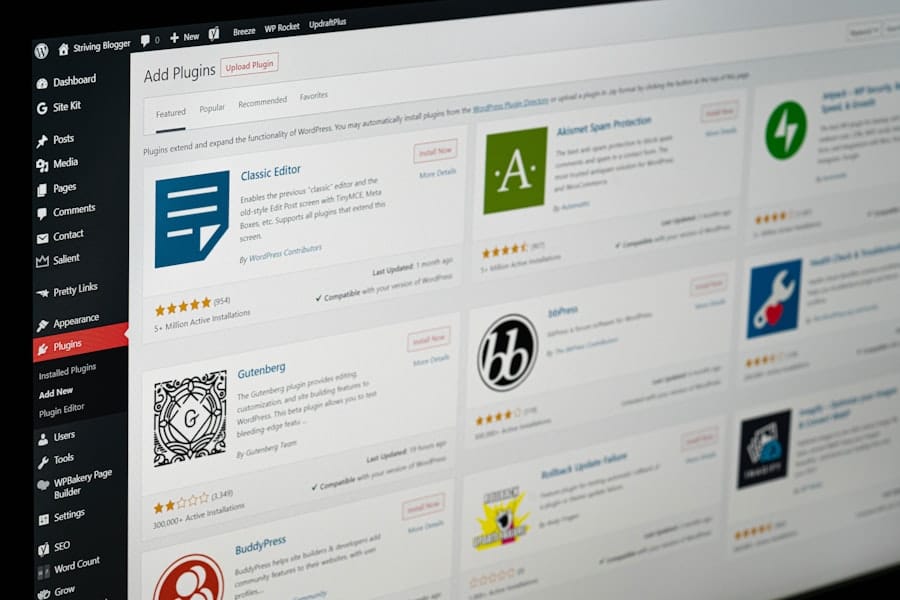
One of the standout features of WordPress is its ability to extend functionality through widgets and plugins. Widgets are small blocks that perform specific functions on your site, such as displaying recent posts or social media feeds. You can easily add these widgets to your sidebar or footer areas through the WordPress dashboard.
This allows you to provide additional information or features without cluttering your main content area. Plugins take functionality a step further by adding new features to your website. There are thousands of plugins available in the WordPress repository, ranging from SEO tools to contact forms and e-commerce solutions.
For beginners, some essential plugins include Yoast SEO for optimizing content for search engines, Akismet for spam protection, and Elementor for drag-and-drop page building. When installing plugins, be mindful of their compatibility with your theme and other plugins to avoid conflicts that could disrupt your site’s performance.
Optimizing Your Website for Mobile Devices
| Customization Aspect | Description | Typical Options | Impact on User Experience |
|---|---|---|---|
| Templates | Pre-designed layouts to choose from | Business, Portfolio, Blog, E-commerce | Improves visual appeal and structure |
| Color Scheme | Selection of colors for backgrounds, text, and accents | Preset palettes or custom colors | Enhances brand identity and readability |
| Fonts | Typography choices for headings and body text | Google Fonts, system fonts | Improves readability and style |
| Layout | Arrangement of content blocks and navigation | Grid, single column, multi-column | Facilitates easy navigation and content flow |
| Widgets/Plugins | Additional features like contact forms, social media feeds | Contact form, chat, gallery, newsletter signup | Increases interactivity and functionality |
| Images and Media | Custom photos, videos, and graphics | Upload own media or use free stock images | Enhances engagement and visual storytelling |
| SEO Settings | Options to optimize site for search engines | Meta tags, keywords, alt text | Improves site visibility and traffic |
| Domain Name | Custom web address for the site | Free subdomain or custom domain (may require upgrade) | Builds brand credibility and easier access |
In today’s digital landscape, optimizing your website for mobile devices is no longer optional; it’s essential. With more than half of all web traffic coming from mobile users, ensuring that your site is mobile-friendly can significantly impact user experience and search engine rankings. Fortunately, most modern WordPress themes are designed with responsiveness in mind, automatically adjusting layouts for different screen sizes.
To further enhance mobile optimization, consider using tools like Google’s Mobile-Friendly Test to analyze how well your site performs on mobile devices. Pay attention to loading speeds; slow-loading sites can frustrate users and lead to higher bounce rates. You can improve loading times by optimizing images, minimizing code, and leveraging browser caching through plugins like WP Super Cache or W3 Total Cache.
Integrating Social Media and Sharing Features
Social media integration is another vital aspect of building a successful website. By connecting your site with social media platforms, you can expand your reach and engage with a broader audience. WordPress makes it easy to add social media buttons that allow visitors to share your content on their favorite platforms with just one click.
Plugins like Social Warfare or AddToAny provide customizable sharing options that can be tailored to fit your site’s design. Additionally, consider embedding social media feeds directly onto your website. This not only keeps your content fresh but also encourages visitors to follow you on social media for updates.
You can use plugins like Smash Balloon Social Photo Feed for Instagram or Custom Twitter Feeds for Twitter integration. By fostering a connection between your website and social media channels, you’ll create a more interactive experience for users while driving traffic back to your site.
Utilizing SEO Strategies to Improve Visibility
Search Engine Optimization (SEO) is crucial for increasing the visibility of your website in search engine results pages (SERPs). By implementing effective SEO strategies, you can attract more organic traffic and improve your chances of reaching potential customers or readers. Start by conducting keyword research using tools like Google Keyword Planner or Ubersuggest to identify relevant keywords related to your niche.
Once you have a list of target keywords, incorporate them naturally into your content, headings, and meta descriptions. Using plugins like Yoast SEO can help guide you in optimizing each page for search engines while ensuring that your content remains engaging for readers. Additionally, focus on creating high-quality content that provides value to your audience; this not only helps with SEO but also establishes you as an authority in your field.
Testing and Fine-Tuning Your Website for the Best User Experience
After building out your website and implementing various features, it’s essential to test and fine-tune it for optimal user experience. Begin by checking all links to ensure they direct users where intended; broken links can frustrate visitors and harm your SEO efforts. Additionally, test the functionality of forms and interactive elements to confirm they work seamlessly.
Gather feedback from friends or colleagues who can provide insights into usability and design elements you may have overlooked. Tools like Google Analytics can help you track user behavior on your site, allowing you to identify areas for improvement based on real data. Regularly updating content and features will keep your site fresh and engaging while ensuring that it meets the evolving needs of your audience.
In conclusion, building a free website with WordPress is an achievable goal that anyone can accomplish with the right guidance and resources. By carefully choosing the right platform, selecting an appropriate template, customizing it to reflect your brand identity, enhancing functionality with widgets and plugins, optimizing for mobile devices, integrating social media features, utilizing effective SEO strategies, and continuously testing for user experience improvements, you’ll be well on your way to creating a successful online presence. Remember that this journey is not just about launching a website; it’s about creating a space where you can share your passions or promote your business effectively.
For further resources on enhancing your WordPress skills or exploring advanced features, check out our related articles linked below!
FAQs
What does customizing a free website involve?
Customizing a free website typically involves modifying the design, layout, colors, fonts, and content to better suit your personal or business needs. This can include adding images, changing text, adjusting navigation menus, and integrating widgets or plugins.
Are there limitations when customizing a free website?
Yes, free website platforms often have limitations such as restricted access to advanced design features, limited storage and bandwidth, mandatory platform branding or ads, and fewer options for custom domain names.
Can I use my own domain name with a free website?
Most free website builders allow you to create a website with a subdomain (e.g., yoursite.platform.com). To use a custom domain name (e.g., yoursite.com), you usually need to upgrade to a paid plan.
Is coding knowledge required to customize a free website?
No, many free website builders offer drag-and-drop editors and pre-designed templates that require little to no coding knowledge. However, some platforms allow advanced users to add custom HTML, CSS, or JavaScript for further customization.
Can I add e-commerce features to a free website?
Some free website builders offer basic e-commerce features, but these are often limited. For full e-commerce functionality, including payment processing and inventory management, upgrading to a paid plan is usually necessary.
Will my customized free website be mobile-friendly?
Most modern free website builders provide responsive templates that automatically adjust to different screen sizes, ensuring your site looks good on mobile devices.
How do I ensure my free website is SEO-friendly?
Many free website platforms include basic SEO tools such as customizable page titles, meta descriptions, and URL structures. To improve SEO further, you can add relevant content, use keywords strategically, and ensure fast loading times.
Can I remove ads from a free website?
Typically, free website plans include platform advertisements that cannot be removed. To eliminate ads, you usually need to upgrade to a paid subscription.
Is it possible to transfer my free website to another platform?
Transferring a free website can be challenging because many platforms do not allow exporting the site’s design or content easily. It often requires rebuilding the site on the new platform.
How secure is a free website?
Free website builders generally provide basic security features such as SSL certificates. However, advanced security options and backups may be limited or only available with paid plans.
Leave a Reply